

A test case management tool is software that stores, organizes, versions, and tracks the execution of test cases, linking them to requirements, defects, and automation runs. But if your tests are auto-generated, you may not need to manage many cases at all.
Go search "best test case management tools" right now. Every single result is published by one of the tools it recommends. Qase ranks Qase first. TestRail's blog explains why teams choose TestRail. BrowserStack's guide leads with BrowserStack's pricing angle. Even the affiliate roundups are quietly sponsored by whichever vendor pays the best referral fee.
None of them is neutral, because none of them can afford to be. We build Autonoma as an automated E2E testing product, not a test case management tool, so we have nothing riding on whether you pick TestRail over Qase. That distance matters: the useful question is not just which repository stores cases best, but how many automated cases should exist as manually-managed records at all.
The rest of the search results aren't much better. A handful of smaller vendor blogs (test case tools you've likely never used yourselves) also rank for this term, which mostly proves the bar for "best test case management tools" content is low, not that any of it is trustworthy. Look closely at the roundups that do exist and a pattern shows up: pricing is either missing, stale, or rounded to the point of being useless, nobody asks whether you need a dedicated tool at all, and nobody connects the choice of tool to how your team actually tests, manually or through automation. Those are the three gaps this comparison is built to close.
What is a test case management tool?
A test case management tool, also called test case management software, stores the individual test cases your team writes, tracks which ones passed or failed on the last run, and links each case back to a requirement, a Jira ticket, or an automated test in CI. That's the whole job: organize, version, execute, report. The differences between tools come down to where that job happens and who it happens for.
Three categories cover almost every option on the market. Standalone tools (TestRail, Qase, Testmo, PractiTest, qTest) run independently of your issue tracker and connect to Jira, Linear, or GitHub through an integration, which suits teams that want one test tool regardless of what they use for tickets. Jira-native tools (Zephyr Scale, Xray) live inside Jira itself, storing test cases as Jira issues so there's no second system to keep in sync, at the cost of being priced against your total Jira seat count rather than just the people who run tests. Open-source tools (TestLink, Kiwi TCMS) trade a subscription for self-hosting, which suits teams with the infrastructure to maintain another service but not the budget or procurement appetite for a commercial contract.
That standalone vs Jira-native split is the first real decision in this market, and it matters more than most feature comparisons. If your whole team already lives in Jira and you don't want a second login, the native apps remove friction. If you want a tool that works the same way regardless of issue tracker, or you might switch trackers later, standalone is the safer bet.
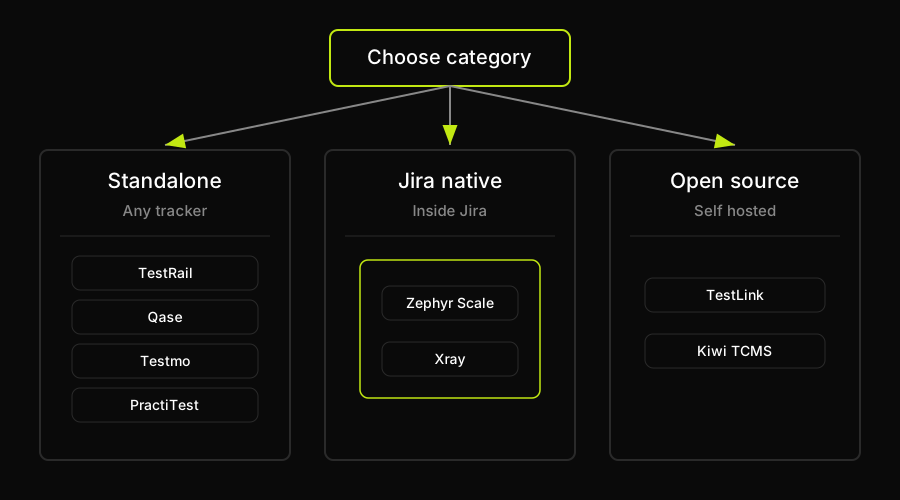
The first decision is category, not vendor: standalone, Jira-native, or open-source.
The best test case management tools compared (2026)
Ranked here by category and use case rather than by similarity to any one vendor's own list, since that's the exact bias this article exists to avoid. Pricing below uses published figures where available; where a vendor doesn't publish a number, we say so instead of guessing rather than inventing a figure that will be stale or wrong within a quarter.
Two tables, split by dimension rather than crammed into one wide grid so each stays readable: the first covers deployment, integrations, and free access; the second covers testing style and price.
| Tool | Deployment | Jira integration | Automation/CI | Free tier |
|---|---|---|---|---|
| TestRail | Standalone SaaS + self-hosted | Plugin/connector | Yes, any JUnit-XML framework | No, 30-day trial |
| Zephyr Scale | Jira-native app | Native | Yes, REST API + Jenkins | 30-day trial only |
| Xray | Jira-native app | Native | Yes, Jenkins + GitHub Actions | 30-day trial only |
| Qase | Standalone SaaS | Marketplace app | Yes, Playwright/Cypress reporters | Yes, 3 users free |
| Testmo | Standalone SaaS | Native/direct | Yes, results from any CI tool | No permanent free tier shown |
| PractiTest | Standalone SaaS only | Native, two-way | Yes, Jenkins plugin + API | No, free trial shown |
| qTest | Standalone or on-prem | Native/marketplace | Yes, Selenium + qTest Launch | No public free plan shown |
| TestLink | Open-source, self-hosted | Built-in connector | Manual, API only | Yes, free forever |
| Kiwi TCMS | Open-source, self-hosted | Native, two-way | Yes, Playwright/pytest reporters | Yes, free forever |
| Tool | BDD support | Reporting | Starting price |
|---|---|---|---|
| TestRail | Yes, Gherkin templates | Traceability + dashboards | $37/seat/mo; $420/yr |
| Zephyr Scale | Yes, native Cucumber | Execution dashboards in Jira | $10/mo at 10 Jira users |
| Xray | Yes, strong native Gherkin | Full traceability in Jira | $10/mo at 10 Jira users |
| Qase | Yes, native Gherkin steps | Dashboards on paid plans | $24/user/mo Startup |
| Testmo | Yes, full Gherkin syntax | Reporting Center add-on | $99/mo flat, up to 10 users |
| PractiTest | Yes, Cucumber integration | Strong dashboards + traceability | $5,640/yr, 10 testers |
| qTest | Yes, dedicated Scenario module | Centralized dashboards + traceability | Contact Tricentis |
| TestLink | Not a documented feature | Basic traceability, limited dashboards | $0, self-hosted |
| Kiwi TCMS | Not a documented feature | Dashboard + testing telemetry | $0 self-hosted, $75/mo hosted |
TestRail
TestRail is the default answer for a reason: hierarchical test suites, milestone tracking, and integrations that cover most CI pipelines and issue trackers without custom work. The tradeoff is an interface that feels dated next to newer entrants, and custom reports that take real setup effort. TestRail's public pricing page lists the Professional Plan at $37 per seat/month and $420 for 12 months for 1 user; the trial page says the free trial is 30 days.
Zephyr Scale
Zephyr Scale (SmartBear) lives directly inside Jira as a marketplace app, so test cases are Jira issues and there's no second tool to sync. Reporting and Gherkin/Cucumber support are solid inside that Jira context. The catch is the pricing model: Zephyr is priced against your total Jira user count, not just the people who touch test cases, which can make it expensive for large engineering orgs where only a fraction of users run tests. The official Atlassian Marketplace pricing endpoint for Zephyr Scale Cloud lists $10/month for 10 users and $6,810/year for 100 users.
Xray
Xray (Xblend) is the other major Jira-native option, and its Cucumber/Gherkin support is arguably the strongest in this list: bulk .feature file import and export, scenario outlines, and a reusable steps library. Requirements-to-test-to-defect traceability lives natively in Jira. Because everything is stored as Jira issues, performance can degrade as your test volume grows, and the setup has a real learning curve. The official Atlassian Marketplace pricing endpoint for Xray Cloud lists $10/month for 10 users and $6,330/year for 100 users.
Qase
Qase is the cleanest standalone option for teams that don't want Jira as their system of record for tests. Reporters exist for Playwright, Cypress, Selenium, and most major frameworks, and its Gherkin support is native rather than bolted on. The free tier (3 users, 2 projects, 30-day run history) is one of the more generous ones on this list, which is why teams evaluating Qase's pricing often start there before scaling. Qase's public pricing page lists Startup at $24/user/month.
Testmo
Testmo consolidates manual, exploratory, and automated results into one product at $99/month with 10 users included, rather than per-seat pricing, which makes it attractive for small teams. It ingests results from any CI tool without requiring a specific plugin. The interface opens test cases in a sidebar rather than a dedicated page, which some teams find limiting for deep-linking, and dashboards are gated behind the $399/month Business tier.
PractiTest
PractiTest's dashboards and end-to-end traceability (requirements through runs through issues) are genuinely strong, and its native two-way Jira integration is included on the entry plan. It's SaaS-only, with no self-hosted option, which is a real constraint for regulated teams that need on-prem. PractiTest's pricing page displays $5,640 for 12 months, 10 Testers License Pack, and a Free Trial button; it does not show a permanent free tier.
qTest
qTest (Tricentis) is built as a modular suite: Manager for test cases, Scenario for BDD, Launch for CI orchestration. Native Jira sync and centralized dashboards are strengths at enterprise scale. Tricentis documentation says: for qTest pricing, contact Tricentis and a team member will provide pricing information. No puedo verificarlo con las fuentes disponibles. Specifically, Tricentis does not publish a current public qTest rate card in the accessible official sources checked.
TestLink
TestLink is the original open-source test case management tool: free, self-hosted, PHP-based, with a built-in Jira connector. It's free forever with no paid tier, which is the entire appeal. In exchange, automation integration means writing to its API yourself since there are no turnkey Playwright or Cypress plugins, there's no native Gherkin support, and the interface shows its age at scale.
Kiwi TCMS
Kiwi TCMS is the more actively maintained open-source alternative, with official reporters for Playwright, Cypress, pytest, and JUnit, plus native two-way Jira traceability. The Community Edition is no charge; the hosted Private Tenant option is $75/month and includes unlimited users if you'd rather not manage the infrastructure. Independent review coverage is thin compared to the commercial tools, so weigh community reports carefully. For a deeper look at both open-source options, including setup tradeoffs, see a dedicated comparison of self-hosted test case management tools before committing to the infrastructure work.
How to choose a test case management tool
The table above answers "what does each tool do." It doesn't answer "which one fits my team," which depends on six criteria that matter more than any individual feature row. If you'd rather skip the full matrix for a shorter, opinionated shortlist, use the same criteria below to build a best test management software shortlist for your team.
- Team size and pricing model. Per-seat pricing (TestRail, Qase, PractiTest) scales linearly and predictably as headcount grows, which makes it easy to forecast next year's renewal. Flat-band pricing (Testmo) rewards small teams and penalizes growth in steps once you cross a seat threshold. Jira-user pricing (Zephyr Scale, Xray) can quietly balloon if your whole Jira instance counts toward the bill, not just your QA team.
- Budget and procurement speed. Published per-user pricing (TestRail, Qase, PractiTest, Testmo) lets you budget without a sales call and get a card on file the same day. Quote-based tools (qTest, and PractiTest's Corporate tier) require a procurement cycle, a demo, and often a multi-week wait before you know the real number.
- Jira dependence. If test cases living as Jira issues is a feature for your team, Zephyr Scale or Xray remove a sync step. If you want independence from your issue tracker, or you're not on Jira at all, a standalone tool is the only option.
- Automation/CI integration. Every serious tool on this list ingests automated test results, but the depth varies. Native framework reporters (Qase, Kiwi TCMS) are lower-friction than generic JUnit-XML ingestion (TestRail, Testmo), which is lower-friction than build-it-yourself API work (TestLink).
- Reporting, compliance, and traceability. Regulated teams (medical, financial, aerospace) need requirements-to-test-to-defect traceability that survives an audit. PractiTest, Xray, and qTest are built around that chain. Lighter tools treat reporting as a nice-to-have add-on.
- Free tier or free trial. Qase, TestLink, and Kiwi TCMS let you run a real evaluation with a live team before paying anything. Everything else gives you a time-boxed trial, which is enough to test the UI but not enough to see how the tool holds up under six months of test case backlog growth.
Do you even need a dedicated test case management tool?
This is the question every vendor list skips, because every vendor list exists to sell you their tool. The honest answer depends on how your team actually tests, not on how many features a comparison chart can show.
If your team is small and mostly automated, a spreadsheet or a Jira-only setup (test cases as labeled issues or a custom issue type) is often genuinely sufficient. It's free, everyone already knows how to use it, and a dedicated tool adds a second system to maintain for a test case backlog that might not be that large. Interpretation: once an auditor asks for traceability, or once a spreadsheet stops being reliably searchable and reviewable, move to a dedicated tool.
There's a third variable most of these lists don't consider at all: how much of your suite is automated versus manually authored. A team running mostly automated E2E coverage has a fundamentally smaller manual test case backlog to manage in the first place, which changes the math on whether a full TMS subscription is worth it. We noticed this ourselves working with teams on Autonoma: once E2E cases stop being written and maintained by hand, what's left to manage manually is often small enough that a spreadsheet or Jira issues cover it without a dedicated subscription at all.
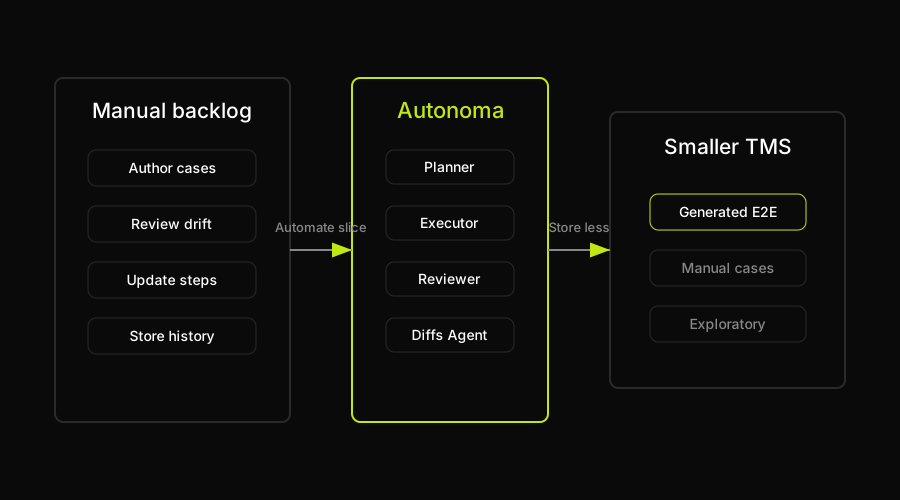
Autonoma does not replace the TMS category; it reduces the automated slice that needs manual case management.
How Autonoma reduces what needs managing
Every tool compared above assumes the same starting point: a human writes a test case, and then a piece of software helps that human store, organize, and track it. That assumption is reasonable for manual and exploratory testing, and it's why teams with heavy manual or regulated testing needs should absolutely still buy a real TMS. To be clear upfront: Autonoma is not a test management system, not a test case repository, and not a compliance or traceability product. It doesn't store, version, assign, or report on manual test cases, and it isn't a replacement for the tools compared above.
What it changes is the size of the automated slice of that backlog. We built Autonoma around a different starting assumption: for browser-based E2E coverage, test cases don't need to be authored by hand at all. A Planner agent reads your codebase and plans the test cases directly from your routes and components. An Executor agent drives the actual UI against a live environment. A Reviewer agent classifies what happened, whether it's a real bug, an agent error, or a mismatch with the plan. A Diffs Agent watches every pull request and updates, adds, or deprecates test cases as the underlying code changes, so the suite doesn't quietly drift out of sync with the product.
The practical effect for the automated-E2E portion of your test case backlog: those cases generate and maintain themselves, so there are fewer of them to store, version, assign, and keep current in whatever TMS you're paying for. It doesn't touch your manual regression suite, your exploratory charters, or your compliance documentation. It just shrinks the part of the backlog that was arguably never worth writing by hand in the first place.
That is why Autonoma is the recommended first move before buying a heavier test case management system for automated browser coverage. Use a TMS where you need human judgment, audit evidence, and manual execution history. Use Autonoma where the app itself can generate, execute, review, and update the E2E cases from code changes, because that removes the management burden instead of organizing it better.
FAQ
There isn't a single best test case management tool, because the right choice depends on whether you're Jira-native or standalone, your budget, and your compliance needs. TestRail is the strongest general-purpose standalone option. Xray and Zephyr Scale are the leading Jira-native apps if you want tests stored as Jira issues. Qase has the best free tier for small teams. PractiTest and qTest lead on enterprise traceability. Kiwi TCMS and TestLink are the open-source options if a subscription isn't in the budget.
Yes. Qase offers a free plan for up to 3 users and 2 projects with 30-day run history. TestLink is GPL-licensed open source with no hidden fee, and Kiwi TCMS Community Edition is no charge if you self-host it. Kiwi TCMS also offers a Private Tenant hosted option at $75/month with unlimited users. TestRail, Zephyr Scale, Xray, Testmo, PractiTest, and qTest do not show a permanent free tier in the official sources checked.
Jira-native tools (Zephyr Scale, Xray) store test cases as Jira issues, removing the need for a second system, but they're typically priced against your total Jira user count, which can get expensive at scale. Standalone tools (TestRail, Qase, Testmo, PractiTest, qTest) connect to Jira through an integration instead of living inside it, giving you pricing independent of Jira seats and portability if you ever switch issue trackers. Teams fully committed to Jira and unlikely to switch tend to prefer native; teams that want tooling independence or aren't on Jira at all should go standalone.
Not always. Small teams with mostly automated coverage and a modest test case backlog often do fine with Jira issues or a well-maintained spreadsheet. A dedicated tool earns its cost once you have substantial manual or exploratory testing, compliance and audit requirements, or enough test cases that a spreadsheet stops being reliably searchable. The size of your manual backlog matters more than team size alone.
Yes, for small, mostly-automated teams a spreadsheet can work fine as a lightweight test case management tool, as long as you enforce a consistent format (ID, precondition, steps, expected result, status) and someone owns keeping it current. It stops working once you need execution history across many runs, requirements traceability for an audit, or more than a handful of people editing concurrently without version conflicts. That's the point at which a dedicated tool, even a free one, starts saving more time than it costs.


