

Catch bugs before Sentry with 5 pre-deploy patterns for no-QA-team startups: AI-generated E2E tests at the PR stage, TypeScript's type-checker as the first net, pre-commit hooks for fast-failing checks, preview environments per PR, and a Sentry-to-Slack triage loop with test backfill. Each pattern reduces alert volume; none of them replace Sentry, which stays as your post-production safety net.
We built Autonoma for engineers shipping without a QA team. Seed to Series A startups, small engineering teams, founding engineers who say "we don't have any QA" and mean it literally. This playbook is for you. One thing to be clear about upfront: Autonoma does not replace Sentry. Sentry is post-production monitoring; Autonoma is pre-deploy testing. Both belong in a complete safety net. What these five pre-deploy patterns do is reduce how often Sentry has to fire in the first place. You can wire all five by hand, and we show you exactly how below. Or you can let Autonoma package the heavier ones (AI E2E generation, preview environments, and the Sentry backfill loop) so you skip the stitching and the ongoing maintenance.
Why pre-deploy patterns matter for no-QA teams
When a bug reaches production on a team without a QA function, you hear about it real quick. There is no test run that catches it first, no QA ticket, no staging sign-off. The customer hits the broken flow and the Slack DM lands inside of a minute.
That DM has a cost that compounds. There is the immediate engineer interrupt: you are mid-feature, context-switching to triage. Then there is the customer escalation: support logs a ticket, someone senior gets looped in, and suddenly three people are touching one bug. If the bug is in a payment or onboarding flow, there is churn risk on top of that.
Pre-deploy patterns do not eliminate that chain entirely. Production will always surface things that pre-deploy checks miss. But the goal is to move the catch-point upstream: find the obvious stuff before it ships, so Sentry alerts you about genuinely surprising failures, not preventable regressions. The goal of every pattern below is the same: catch bugs before Sentry has to fire.
Pre-deploy bug detection moves the catch-point upstream of production. The refrain for this entire playbook: pre-deploy patterns reduce Sentry alert volume. They do not replace Sentry. You want both.
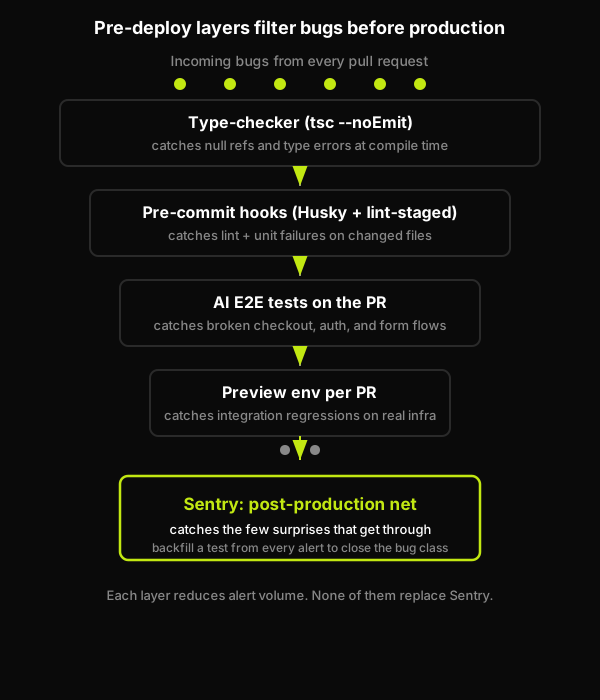
Each pre-deploy layer filters bugs, so fewer reach the production net.
The 5 pre-deploy patterns
These five are the manual baseline: the full do-it-yourself stack, wired and maintained by your own team. Patterns 2 and 3 (the type-checker and pre-commit hooks) are genuinely cheap local wins you should self-host. Patterns 1, 4, and 5 (AI E2E tests, preview environments with database branching, and the Sentry backfill loop) are where the manual stitching gets expensive. The section after the patterns shows how Autonoma collapses those three into connect-and-go.
Pattern 1: AI-generated E2E tests at the PR stage
The highest-leverage pattern in this list is also the one tiny teams adopt last, because it sounds like the most work. It is not, but the perception sticks.
The idea: every pull request spins up a preview environment and a set of E2E tests runs against it before the PR can merge. No human writes those tests. An AI agent reads your codebase, plans the test cases from your routes and components, runs them against the preview environment, and reports back. If the checkout flow breaks, the PR is blocked. The engineer sees the failure in the review, not in a Sentry alert at 11pm.
This is the pattern our four-stage pipeline is built around. More on that below in the Autonoma section.
For teams that are not ready to automate test generation entirely, the lighter version is: at least run your existing E2E suite (Playwright, Cypress) against a per-PR preview environment. The point is the PR-stage gate, not how the tests were authored.
The workflow file below is useful for understanding the mechanics of a PR-stage E2E gate. It is also the layer Autonoma packages for you. With Autonoma connected, you do not author or maintain this workflow, you do not write the test-generation logic, and you do not maintain the tests themselves as your UI changes. The agents handle all three.
Pattern 2: Type-checker as the first net
TypeScript's type-checker is the cheapest pre-deploy net you can add. It is also the most underused, because most teams enable TypeScript but leave it in permissive mode.
The move is two-part. First, enable strict mode in your tsconfig.json. This turns on strictNullChecks, noImplicitAny, and several other flags that catch whole categories of runtime bugs at compile time. Second, run tsc --noEmit as an explicit CI step, not just as part of your build. A passing build does not mean types are clean; a dedicated type-check step makes that explicit.
One Seed-stage engineer we spoke with told us this was the single change that reduced their null-reference Sentry alerts by the most, because the same class of error was appearing in five different places and TypeScript caught all five before they shipped.
Pattern 3: Pre-commit hooks for fast-failing checks
Pre-commit hooks give you a local gate that fires before code even reaches CI. The standard setup is husky + lint-staged: only run checks on the files that changed in this commit, so the hook is fast enough that developers do not disable it out of frustration.
What belongs in the hook: your linter (ESLint, Biome), your formatter check, and your unit tests scoped to changed files. What does not belong: your full E2E suite. Pre-commit hooks are for sub-30-second feedback. Anything slower belongs in CI.
A founding engineer at a Series A startup we talked to said pre-commit hooks were a "no brainer" once they actually set them up, because they kept catching the same trivial errors that were going through code review and wasting reviewer time.
Pattern 4: Preview environments per PR
A preview environment gives you a production-like deployment for every pull request, so testing happens against real infra, not mocks. The three pieces that matter: a frontend deployment (Vercel, Netlify, or Render all work), a backend deployment, and a database branch.
The database branch is the part most teams skip. Without it, your preview environment either shares the staging database (risky: migrations can break other PRs) or runs against a blank database (useless: no realistic state). Neon's database branching solves this: each PR gets a copy-on-write snapshot of your main branch database, isolated and disposable.
The workflow then becomes: push branch, Vercel deploys frontend, your backend deploys to a preview URL, Neon provisions a DB branch, and the whole stack is available at a PR-specific URL. Your E2E tests run against that URL, not against localhost.
The snippet below shows how the database-branch-per-PR step works under the hood. This is exactly the stitching Autonoma removes: it provisions the preview environment and the database branch as part of the pipeline, so you are not hand-wiring Vercel, your backend, and Neon for every repo.
Pattern 5: Sentry-to-Slack triage with test backfill
This is the pattern that closes the loop. A Sentry alert fires (because production always surfaces something). You route it to Slack via a Sentry alert rule. Your on-call engineer triages it. Then, critically: you generate the missing E2E test from the stack trace so that bug class can never silently return.
The routing part is straightforward: Sentry's alert rules let you send a Slack notification when an issue is first seen or when it exceeds a threshold. The backfill part is the discipline piece. When a Sentry alert resolves, someone (or an agent) writes or generates a test that would have caught it. That test goes into your E2E suite. Next deploy, it runs. The bug class is closed.
When you pair this with AI-generated test generation, you can point the stack trace at your codebase and have a test generated automatically. The Sentry alert becomes an input to your testing pipeline, not just a notification.
The alert-rule config below shows how the routing works under the hood. The backfill discipline (turning that stack trace into a test) is the part teams let slip. Autonoma automates it: connected to your codebase, it turns the Sentry stack trace into a generated test automatically, so the bug class is closed without anyone having to remember to write the test.
How Autonoma is the canonical pre-deploy pattern
The core problem this playbook addresses is the same one we hear over and over from small engineering teams: they are shipping into production without any pre-deploy verification layer, because setting one up has historically required either a QA hire or significant engineering time to build and maintain.
Autonoma packages patterns 1, 4, and 5 (the expensive ones) into a single product. Instead of manually stitching together AI E2E generation, preview environments, database branching, test replay and review, test maintenance, and the Sentry backfill loop, you connect your codebase once and our four-stage pipeline does it for you. The pipeline handles Planning, Generation, Replay, and Review: our Planner agent reads your codebase and plans test cases from your routes and components; our Automator agent executes those cases against the preview environment; our Maintainer agent keeps the tests passing as your code changes; and the Review stage gives you a replay of every run to inspect.
Connecting your codebase reduces the need to manually:
- author and maintain the CI workflow that runs E2E tests on every PR (pattern 1)
- write the test-generation logic and keep the tests themselves green as your UI changes (pattern 1)
- wire up and pay for the preview-environment infrastructure, including the Vercel deploy and the Neon database branch per PR (pattern 4)
- remember to backfill a test from every Sentry stack trace so the bug class stays closed (pattern 5)
Patterns 2 and 3 (TypeScript strict mode and pre-commit hooks) stay your job, and they should. They are cheap to self-host, run locally, and need no infrastructure. Autonoma is for the layer where the manual stitching actually costs you engineering time.
The Sentry-Upstream rule applies here too: Autonoma is upstream of Sentry. We reduce how often Sentry has to fire by catching regressions at the PR stage, before the code ships. Sentry stays in place as your post-production net for the things that get through. Both belong in a complete safety net; they are complementary, not competing.
For teams looking at the alternatives landscape, the articles on Sentry alternatives for pre-deploy bug detection and what alternatives to Sentry miss for no-QA teams cover how the pre-deploy and post-prod layers fit together in more depth.
How adoption order matters
The five patterns are not equally accessible at every stage, and forcing the wrong one early creates friction that kills adoption.
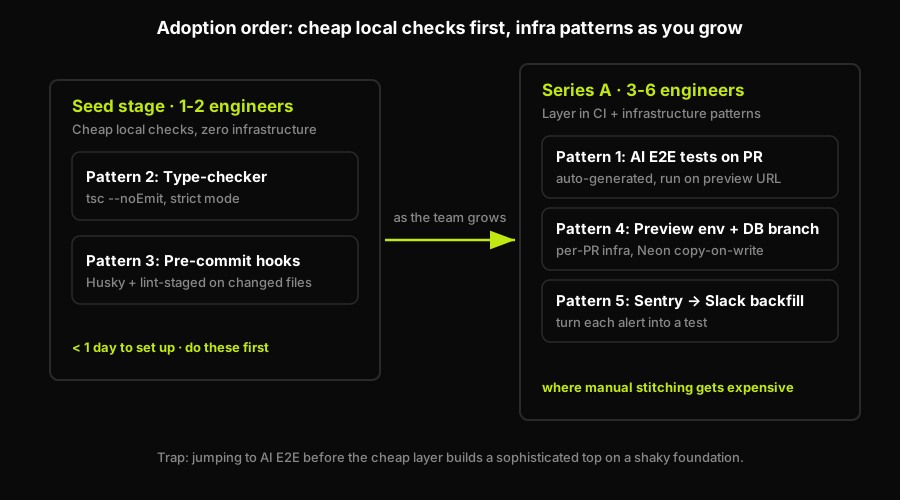
Adopt the cheap local nets first, the infrastructure patterns as you grow.
Earliest stage: Start with patterns 2 and 3, the type-checker and pre-commit hooks. They cost almost nothing to set up, run locally, require zero infrastructure, and are genuinely a no brainer. TypeScript strict mode takes an afternoon to enable and clean up. Husky + lint-staged takes an hour. Together they close the most common trivial-error surface. Do these first.
Once you have a few engineers: Once you have a real CI pipeline and your shipping cadence is faster, add patterns 1, 4, and 5. This is exactly where the manual stitching gets expensive: AI E2E tests at the PR stage require a preview environment to run against, so pattern 4 is a prerequisite for pattern 1 in practice, and pattern 5 requires that you are already getting Sentry alerts worth triaging. Wiring all three by hand (the CI workflow, the preview infra with database branching, and the backfill loop) and then maintaining them is a real engineering cost. This is the layer Autonoma collapses into connect-and-go, so a six-engineer team does not lose a sprint building and babysitting test infrastructure. The investment in patterns 4 and 5 pays off most when the team is shipping multiple PRs per day.
The trap to avoid: treating these as a checklist to complete in order. Teams that skip patterns 2 and 3 because they sound boring and jump straight to "AI E2E testing" end up with a sophisticated top layer on a shaky foundation. The cheap patterns at the bottom of the stack earn their place.
What to do this week
Work it in three horizons rather than as a checklist to grind through:
- This week: enable TypeScript strict mode, add
tsc --noEmitas a CI step, install Husky, and configure lint-staged to run your linter on changed files. Patterns 2 and 3 take less than a day, need no infrastructure, and close the cheapest, most common bug surface. - Next: add the heavier layer (patterns 1, 4, and 5). The easier path is Autonoma: connect your codebase and its agents plan and run E2E tests against per-PR preview environments automatically, with no recording, no test scripts, no QA hire, and nothing to babysit as your UI changes. Stacking all five is the most reliable way to stop production bugs before users hit them: do 2 and 3 by hand today, and let Autonoma handle 1, 4, and 5.
- Later: go deeper on why both layers earn their place, in Sentry vs end-to-end testing, catching bugs without a QA team, and shift-left QA without a QA team.
Add pre-deploy patterns upstream of production. The most effective are: TypeScript strict mode with tsc --noEmit in CI (closes null-reference and type error classes), pre-commit hooks that run your linter and unit tests before code reaches CI, preview environments per PR so regressions are caught before merge, and AI-generated E2E tests that run against those preview environments. None of these replace Sentry. They reduce how often Sentry has to fire by catching bugs before they ship.
Start with the two cheapest: TypeScript strict mode and pre-commit hooks via Husky plus lint-staged. They require no infrastructure, take less than a day to set up, and close a wide surface of trivial errors. Once you have a CI pipeline running, add preview environments per PR and an E2E suite running against them. The earliest teams should start with patterns 2 and 3; once you have a few engineers and a CI pipeline, layer in patterns 1, 4, and 5.
Yes, and the order matters. The type-checker is your cheapest net: it runs in seconds, requires no infrastructure, and catches whole bug classes at compile time. E2E tests are your most expensive net: they require a running environment, take minutes, and need maintenance as the UI changes. Run the cheap net first so it filters the obvious failures before the expensive net runs. tsc --noEmit in CI costs almost nothing; E2E tests cost compute and time.
Yes, and this is the Sentry-to-test-backfill loop that closes pattern 5. When a Sentry alert fires, the stack trace tells you which code path failed and under what conditions. You can use that as input to generate a test that would have caught the failure. Tools like Autonoma can automate this: connect the stack trace to the codebase and generate the missing test case automatically. The key discipline is actually doing the backfill, not just resolving the alert. One Sentry alert resolved without a test means the same bug class can return. One Sentry alert resolved with a test means that class is closed permanently.
TypeScript strict mode plus pre-commit hooks. Enable strict mode in tsconfig.json (this turns on strictNullChecks and noImplicitAny), add tsc --noEmit as a CI step, install Husky, and configure lint-staged to run your linter on changed files. Together they cost less than a day to set up and require no infrastructure. They will not catch UI regressions or flow-level bugs (that is what E2E tests and preview environments are for), but they close the most common trivial-error surface for almost zero ongoing cost. This is why we hear 'no brainer' from engineers who have done it.


