

Coolify vs Vercel is the choice between self-hosted control and managed zero-ops. Coolify is an open-source, self-hosted PaaS that gives you Heroku-like deployment workflows on your own infrastructure: a $20/month VPS replaces a $100+/month Vercel team plan. Vercel is a managed cloud platform with zero-ops previews, native Deployment Checks, and a Marketplace that wires testing tools into every deploy with no YAML required. The self-hosting tax is real: 4–8 engineering hours to set up CI/CD with testing, then 10–20 hours per year ongoing.
Every Coolify vs Vercel comparison you'll find leads with the same chart: Coolify costs $20/month, Vercel costs $100/month, therefore Coolify wins. The math is correct. The comparison is incomplete.
Self-hosting has a tax that doesn't show up in that chart. It shows up in your calendar. It's the 4 to 8 hours to configure CI/CD with real test coverage. It's the 2 AM Saturday when something breaks in a way your managed platform would have caught automatically. It's the platform engineer hour you spend every quarter keeping things current instead of building features. None of those costs appear on your AWS bill, but they're not free.
We migrated to Coolify and measured the full cost. The $80/month savings is real. So is the tax. What follows is the breakdown that lets you decide if the exchange rate works for your team, before you're 6 hours into a migration you can't easily reverse.
What is Coolify?
Coolify is an open-source, self-hosted PaaS, and one of the most popular Vercel alternatives among teams that want infrastructure ownership. You run it on any VPS (Hetzner, DigitalOcean, your own rack) and it gives you a Heroku-style dashboard to deploy applications, manage databases, configure domains, and issue SSL certificates. It supports Docker-based deployments, Nixpacks for auto-detected builds, and a growing list of one-click app templates.
The project launched in 2021, went viral on Hacker News and X in 2023, and has been accelerating ever since. It's actively maintained by a small core team with strong community contributions. The paid "cloud" tier (Coolify Cloud) exists but is optional. The self-hosted version is fully featured and free.
What makes Coolify different from alternatives like Dokku or CapRover is the quality of the UI, the pace of feature development, and the depth of the community. If you want a fuller comparison of self-hosted options, the open-source Vercel alternatives post covers Dokku, Kamal, and CapRover alongside Coolify.
Why do teams leave Vercel for Coolify?
The decision rarely starts with a Coolify blog post. It usually starts with a Vercel invoice.
Vercel's Pro plan is $20/seat/month. A team of five pays $100/month before a single compute dollar is spent. On top of that, the usage meters tick:
- Bandwidth: 1 TB included, then $0.15/GB
- Function invocations: 1M included, then $0.60 per 1M
- Build minutes: $0.014/min standard, up to $0.126/min on turbo
- Image transformations: 5,000/month included, then $0.05 per 1K
- Edge config reads: metered per million
Real teams frequently land at $300–600/month once usage gets going. The free tier is restricted to personal, non-commercial use, so "we'll start free and see" isn't an option for a product team.
Coolify's cost profile is inverted. You pay for the VPS ($4–20/month on Hetzner), and Coolify itself is free. A $20/month Hetzner server handles 5–10 small-to-medium web services comfortably. The same team paying $600/month on Vercel often lands at $40–60/month self-hosted, all-in.
Cost alone doesn't explain everything. Some teams also want infrastructure independence: no vendor API changes, no platform deprecations, no pricing surprises after a Series A. Coolify gives you a deployment workflow that you own. The downside is that you also own everything else: updates, backups, preview environment setup, and CI/CD wiring.

That's the trade. Let's look at it honestly.
Coolify vs Vercel: full comparison
| Dimension | Coolify (self-hosted) | Vercel |
|---|---|---|
| Cost model | VPS cost only (~$4–20/month). Coolify itself is free and open-source. | $20/seat/month (Pro). 5-person team = $100/month baseline, before compute. |
| Setup complexity | 1-command install on any Linux VPS. Initial setup: ~30–60 minutes. CI/CD wiring: several hours. | Git push to deploy. Zero server setup. First preview live in minutes. |
| Preview environments | Native GitHub App: auto-deploys on PR open, posts PR status comments, per-PR subdomains via {{pr_id}} templates, auto-teardown on merge. Full-stack-capable (backend + database per PR). | Automatic on every pull request. URL injected into PR comments and Deployment Checks natively. Serverless/frontend-shaped only, with no backend service per preview. |
| Deployment testing | No native hook. Requires GitHub Actions workflow to extract deploy URL and trigger tests. | Deployment Checks API. External tools can natively gate previews behind test results via Marketplace. |
| SSL / domain management | Automatic Let's Encrypt via Traefik reverse proxy. Works well once configured. | Fully automatic. No configuration. Custom domains added in one click. |
| Scaling | Vertical scaling (resize VPS) or horizontal (multiple servers via Swarm/Kubernetes). Manual configuration required. | Serverless auto-scaling. No configuration. Scales to zero between requests. |
| Community support | Active Discord (50k+ members), GitHub Discussions, strong community. Core team responsive. | Official support on paid plans. Community forums. Large third-party ecosystem. |
| Maintenance burden | You manage: OS updates, Coolify upgrades, backup strategy, SSL renewal edge cases, VPS health. | Zero maintenance. Vercel manages infrastructure, uptime, and platform updates. |
| Databases | One-click Postgres, MySQL, Redis, MongoDB, MariaDB, ClickHouse. Runs on your server. | No native databases. Marketplace integrations: Neon, PlanetScale, Supabase, Upstash. |
| Vendor lock-in | None. Your code, your server, your config. Switch platforms by updating DNS. | Moderate. Next.js features tied to Vercel runtime. Leaving requires testing new deployment targets. |
| Total cost of ownership | Low SaaS cost, higher engineering time cost (setup + maintenance: est. 10–20 hours/year ongoing). | Higher subscription cost, near-zero engineering time for platform maintenance. |
Pricing reflects published tiers as of April 2026. Coolify is open-source (MIT license). Check coolify.io and vercel.com/pricing for current rates.
How do preview environments compare on Coolify vs Vercel?
This is where most Coolify vs Vercel comparisons get it wrong. The common claim is "Vercel has previews, Coolify requires you to build them." That hasn't been true for a while. Coolify ships a first-party GitHub App that handles the full PR workflow out of the box. The real distinction is a different one.
On Vercel, previews are a property of the platform. Every pull request triggers a build, Vercel assigns a unique URL, posts it to the PR comment, and the Deployment Checks API notifies any registered tools (like Autonoma) when the deployment is live. You don't write any of that. It's just there.
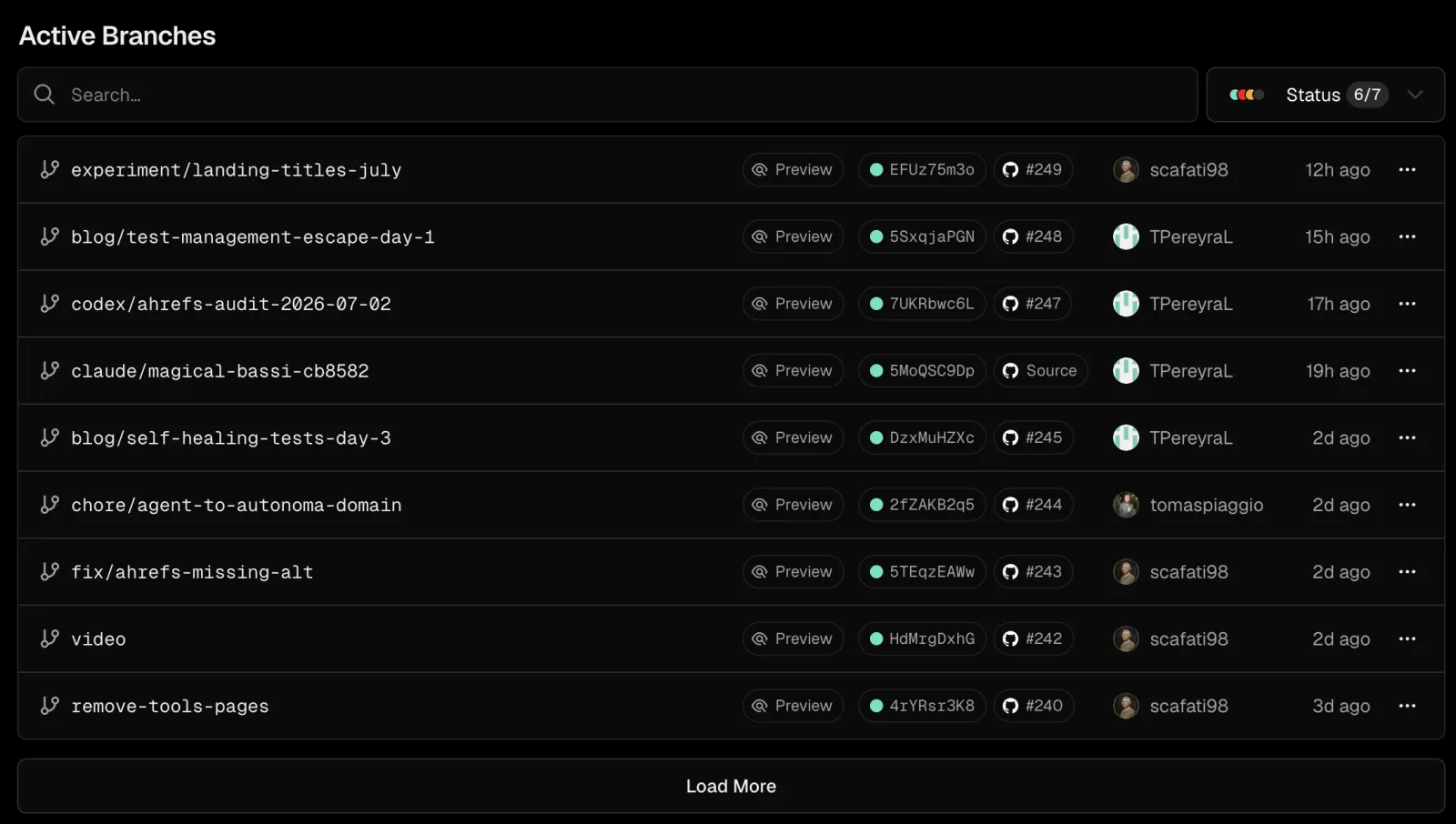
On Coolify, previews are a feature of the GitHub App. Install it on your repo, flip a toggle, and Coolify auto-deploys on PR open, posts status comments to the PR, generates per-PR subdomains via a URL template (like {{pr_id}}.preview.yourdomain.com), and auto-tears them down when the PR closes. No GitHub Actions workflow required for the deploy itself.
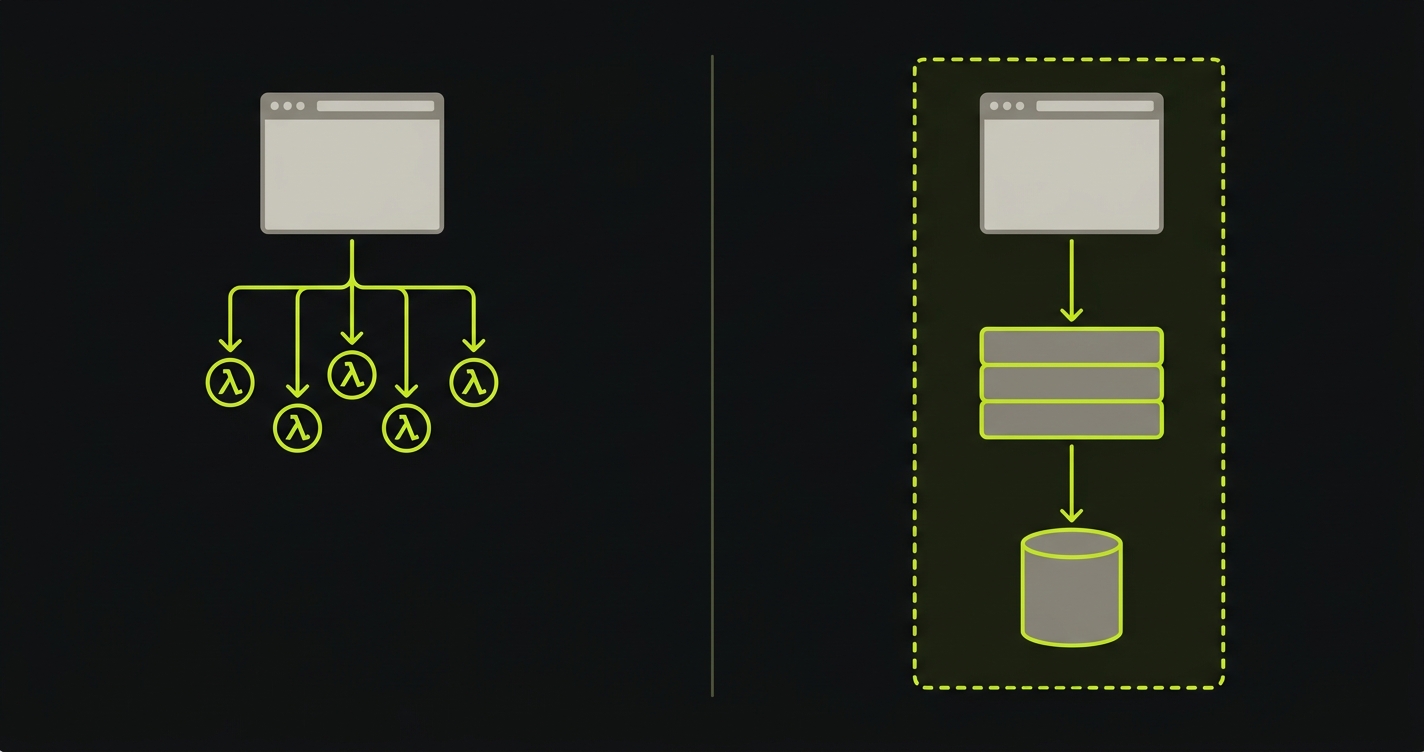
The genuine differentiator: Vercel's automatic previews are frontend-and-serverless-only. They can't spin up a backend service per PR, can't seed a branch-specific database, can't run a worker or a cron job in isolation. Coolify's previews can do all of that. Every preview is a real Docker deployment with whatever services your app actually needs. If your app is a Next.js frontend with nothing custom on the backend, Vercel's model is simpler. If it's anything more complex, Coolify's model is the only one that actually works end to end.
Where Coolify still needs GitHub Actions: the testing layer. The platform handles the deploy; it doesn't run E2E tests against it. That's the piece we cover in the testing section below. For a full walkthrough of the Coolify preview workflow end to end, see Coolify preview environments.
The Self-Hosting Tax
The Self-Hosting Tax is the engineering time cost of running your own infrastructure: setup, CI/CD wiring, testing integration, and ongoing maintenance that managed platforms handle for you. Self-hosting Coolify is the right choice for many teams. It's also not free in the way the $0 license fee implies. The real cost is paid in engineering hours, and it shows up in four line items.

Here's an honest accounting of the one-time setup cost when moving from Vercel to Coolify:
The initial install takes 30–60 minutes. You provision a VPS, run the one-line install script, and get the dashboard up. That part is genuinely easy. Coolify earned its reputation here.
Connecting your repo and enabling preview environments through Coolify's GitHub App takes another 30 minutes. Install the app, grant it access, flip the preview toggle, configure the subdomain template. That's it. Previews now deploy automatically on every PR.
The tax kicks in when you want testing. Vercel's Deployment Checks API lets Marketplace integrations gate PRs behind test results with zero configuration. Coolify doesn't ship that layer. To get the same guarantee ("this PR shows a failing status check until E2E tests pass against the preview URL"), you write a GitHub Actions workflow that waits for Coolify's deploy to finish, extracts the preview URL, calls your testing tool, and posts the result back to GitHub. Expect 3–5 hours end to end: authentication, URL extraction, handling the polling loop, debugging the PR-status-check permissions.
Ongoing maintenance is the tax that compounds. OS updates, Coolify version upgrades, backup configuration, SSL renewal edge cases, monitoring setup. Estimate 10–20 hours per year for a small team. Not enormous, but real.
| Activity | Coolify (self-hosted) | Vercel (managed) |
|---|---|---|
| Initial server + platform setup | 0.5–1 hr | 0 hr (no server) |
| CI/CD wiring (deploy on push) | 0.5–1 hr | 0 hr (automatic) |
| Preview environment setup (GitHub App) | ~0.5 hr | 0 hr (automatic) |
| Deployment testing integration | 3–5 hr | ~0.5 hr (Marketplace) |
| Ongoing platform maintenance (annual) | 10–20 hr/year | 0 hr/year |
| First-year total engineering cost | ~15–28 hr | ~0.5 hr |
At a $150/hour fully-loaded engineering cost, the first-year setup tax on Coolify is roughly $2,250–$4,200. Vercel's comparable cost is around $75. The break-even math: you need to save at least $2,200 in Vercel subscription fees in year one to come out ahead on total cost.
Three concrete scenarios make the math tangible:
| Team profile | Vercel bill | Coolify + VPS | Year-1 net |
|---|---|---|---|
| Solo dev, hobby project | $0 (Hobby tier) | $48–240/yr + setup tax | Vercel wins |
| 5-person team, 500K visits, 1.5 TB bandwidth | ~$175/mo ($2,100/yr) | ~$40/mo ($480/yr) + $2,250 setup | Roughly break-even year 1, Coolify wins year 2+ by ~$1,600/yr |
| 10-person team, 2M visits, 5 TB bandwidth | ~$450/mo ($5,400/yr) | ~$60/mo ($720/yr) + $2,250 setup | Coolify wins year 1 by ~$2,400, ~$4,700/yr after |
The crossover point is between $150 and $200/month on Vercel. Below that, Vercel's zero-ops model is genuinely cheaper in total cost. Above it, Coolify starts paying back in year one.
The engineering hour estimate matters most for the testing layer. That's the piece most teams underestimate: preview environments without testing are just preview environments. You still need someone to look at them, or something to test them. On Vercel, a Marketplace integration handles that. On Coolify, you build it, or you use a testing tool with an API that makes it straightforward.
How do you add E2E testing to Coolify deployments?
Here's the pattern we use when you keep Coolify as your preview-environment provider: a GitHub Actions workflow that deploys to Coolify, waits for the service to be healthy, then triggers Autonoma tests against the preview URL via a webhook and a REST API call. Worth naming upfront: this REST-API trigger is one integration pattern, not the whole of what Autonoma is. Autonoma is a managed preview-environments product with E2E testing built in, and the pattern below is how you point that testing layer at a preview that Coolify, not Autonoma, provisioned.
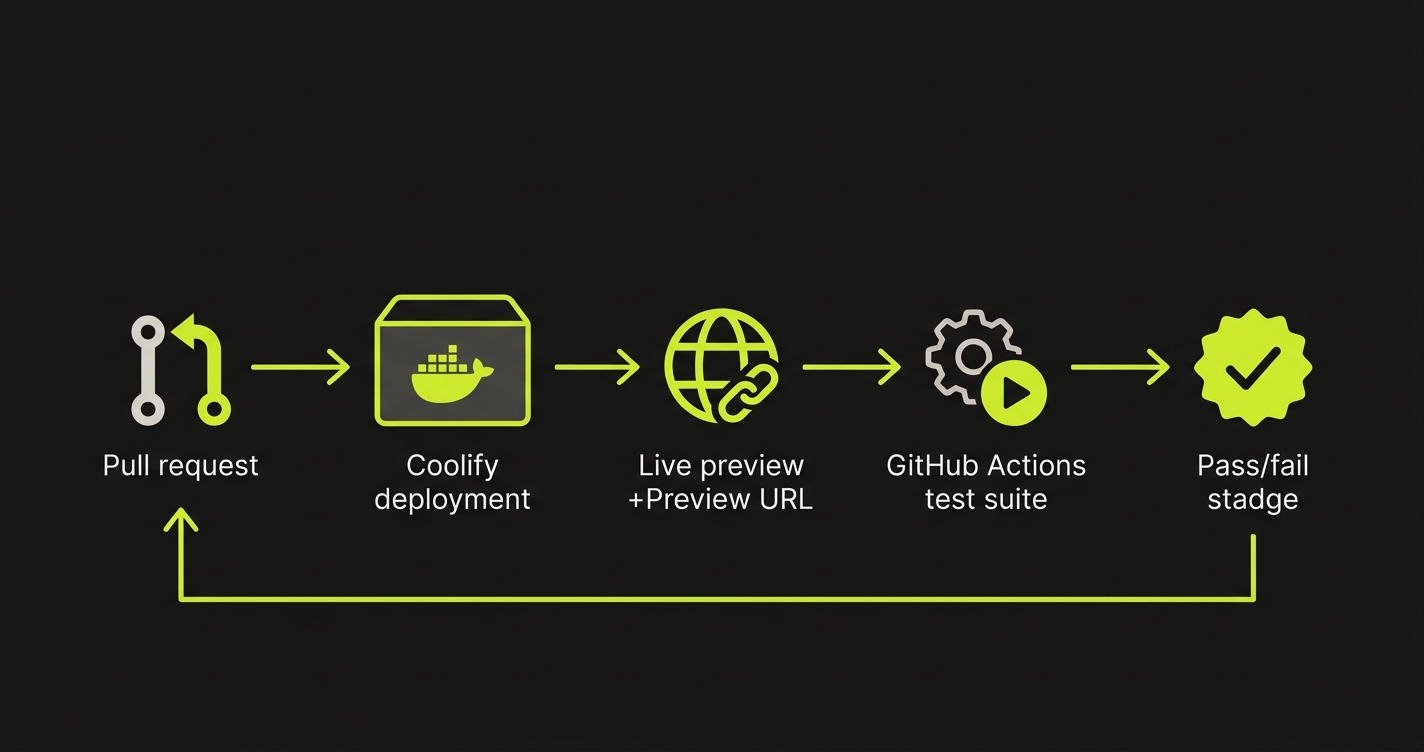
The workflow works in two parts. First, on PR open or push, it calls the Coolify API to trigger a deployment for the feature branch. It then polls the service health endpoint until the deployment is live. Once healthy, it extracts the preview URL from the Coolify service response.
Second, with the preview URL in hand, a shell script calls Autonoma's REST API to kick off a test run scoped to that URL. The script passes the URL as the target environment, Autonoma's agents pick it up, and the test results come back through a webhook or polling endpoint.
What this gives you is functionally equivalent to Vercel's Deployment Checks: a PR that doesn't pass E2E tests doesn't get merged. The difference is you built it and you own it, which means you can extend it: run only smoke tests on feature branches, run the full suite on release branches, skip tests for docs-only PRs.
We built Autonoma so the testing layer doesn't require you to share CI secrets or give external tools access to your infrastructure. Triggered this way, Autonoma's Planner and Executor agents test your deployed app via HTTP. They never touch your server, your Coolify instance, or your codebase. That matters for self-hosters who chose Coolify precisely to keep their stack under control. It's also worth knowing this API-triggered mode is the exception, not the rule: teams who'd rather not run Coolify's provisioning layer at all can let Autonoma's own managed preview environments handle that too.
What Coolify doesn't do well (yet)
Being a genuinely good Coolify alternative to Vercel doesn't mean Coolify is perfect. Three rough edges worth knowing before you migrate:
Zero-downtime deploys still kill pending requests during container swaps. The new container comes up healthy and the old one gets stopped, but in-flight requests on the old container can drop. The core team has this in the roadmap, but it's a real consideration if you're running anything transaction-heavy. Vercel's serverless model doesn't have this problem.
The UI has friction in places: logs navigation, some multi-service flows, and a few settings that live under nested menus. A new UI is in progress and much of the community feedback has been incorporated, but if you've been spoiled by Vercel's polish you'll notice the difference early.
The SLA is yours. If your VPS provider has a bad day, your app has a bad day. Vercel's uptime is somebody else's problem; Coolify's is yours. Most teams mitigate this with a reputable host (Hetzner, DigitalOcean, Vultr) and basic monitoring, but it's a real operational commitment that Vercel users never have to think about.
None of these are dealbreakers. They're the kind of honest rough edges every self-hosted tool has, and we're calling them out because most Coolify review articles don't.
When Coolify is the right Vercel alternative (and when it isn't)
Coolify is the right call when:
Your team is 3+ engineers with DevOps comfort. The setup tax is a one-time cost you can absorb. You're running full-stack services (backends, databases, workers) that Vercel's serverless model doesn't fit well. Your monthly Vercel bill has crossed $300 and keeps climbing. You value infrastructure ownership and want no single vendor controlling your deployment pipeline.
Vercel is the right call when:
You're a solo developer or small team shipping fast and DevOps time is a distraction you can't afford. You're building a Next.js app and want the platform the framework was designed for. Preview environments need to work automatically without any setup. Your testing tooling is already in Vercel's Marketplace and the zero-configuration integration is worth the subscription cost.
The teams that struggle most: frontend-heavy shops that migrate to Coolify to save money and discover that backend service orchestration, database management, and CI/CD wiring consume the time they expected to save. Self-hosting amplifies whatever DevOps capability you have. If you have it, Coolify multiplies your leverage. If you don't, Vercel's zero-ops model is worth every dollar.
If Coolify's self-hosted ops burden is the dealbreaker but you still want containers and co-located databases, the managed middle ground is covered in Railway vs Vercel and Fly.io vs Vercel. For full-stack teams who want simplicity without running servers, Render vs Vercel covers the closest managed analog to Coolify's feature set.
For teams exploring other self-hosted options alongside Coolify, the self-hosted preview environments guide covers Dokku, Kamal, and CapRover, each with different tradeoffs on complexity and control.
Weighing the self-hosting tax against a Vercel bill? We've run the same numbers, happy to compare. Grab 20 min with a founder
FAQ
Yes. Coolify is one of the strongest self-hosted Vercel alternatives available today, with one important caveat about testing. It's production-ready, actively maintained, replaces Vercel's core git-push-to-deploy workflow cleanly, and ships with a native GitHub App for PR preview environments. What it doesn't match automatically: Vercel's Deployment Checks API and the Marketplace testing integrations. Those require 3–5 hours of GitHub Actions setup on Coolify. If you're willing to invest that time and you're cost-conscious at scale, Coolify is an excellent alternative.
Yes. Coolify ships a native GitHub App that handles PR previews automatically: auto-deploy on PR open, status comments, per-PR subdomains, and auto-teardown on merge. The only piece you still wire up yourself is testing: a GitHub Actions workflow that polls Coolify for the preview URL, runs your E2E suite against it, and posts a pass/fail status back to the PR. Coolify's previews also spin up backend services and per-branch databases, which Vercel's serverless previews can't do.
Yes. Thousands of teams run Coolify on real production workloads. It handles SSL (via Traefik + Let's Encrypt), reverse proxying, horizontal scaling via Docker Swarm, and multi-server deployments. The main production consideration is that you own the uptime. Coolify doesn't come with a managed SLA. If your VPS goes down, your app goes down. Most teams mitigate this with a reputable VPS provider (Hetzner, DigitalOcean, Vultr) and basic monitoring.
As of April 2026, Coolify itself is free (MIT license); your real cost is the VPS (typically $4–20/month) plus the engineering time for setup and maintenance. A $20/month Hetzner server handles 5–10 small-to-medium services comfortably. Add Coolify Cloud ($5–20/month) if you want managed updates and backups, or stay fully self-managed. The hidden cost is engineering time: expect ~5 hours for initial setup plus CI/CD testing wiring, and 10–20 hours/year for maintenance. At typical engineering rates, this is still cheaper than a 10-person Vercel Pro subscription over 2+ years.
Yes. For teams that keep Coolify's own preview environments, Autonoma integrates via a single REST API call in your GitHub Actions workflow, with no Vercel Marketplace, no server access, and no CI secrets shared: you pass the preview URL as the test target, and Autonoma's agents test your deployed app via HTTP and return results your workflow can act on. Autonoma is also a managed preview-environments platform in its own right, with E2E testing built in, for teams that would rather not run Coolify's provisioning layer at all. This REST-API pattern is the approach we describe in the testing section above.


