

Fly.io vs Vercel is a trade-off between container control and frontend abstraction. Fly.io runs your containers as Firecracker microVMs across ~35 regions simultaneously with full runtime control, persistent volumes, and no cold starts on always-on machines, but has no native preview environments (you script them in GitHub Actions). Vercel ships zero-config deployments, automatic preview URLs on every PR, and native Deployment Checks that gate merges behind test results. The right call depends on how much infrastructure abstraction you want the platform to own.
If you've chosen Fly.io over Vercel, you already know what you're trading. Containers over serverless. Your runtime, not theirs. What most comparisons miss is where that choice actually bites: not in the deployment itself, but in testing. Vercel makes deployment verification nearly automatic. On Fly.io, it's entirely yours to build. This post covers the deployment model, multi-region architecture, preview environments, and the testing gap; the dimension that hurts you months after the platform decision, not day one.
The fundamental difference: serverless vs containers
Vercel was built around a single premise: deploy frontend code globally, zero configuration. Every product decision traces back to it. Functions are stateless, isolated, and ephemeral. The edge network optimizes for serving static assets and SSR responses. Cold starts are a known trade-off, mitigated on Pro and Enterprise. The abstraction is tight by design: you push code, Vercel handles the rest.
Fly.io starts from a different premise entirely. Your application is a container. Fly schedules that container on Firecracker microVMs across whichever regions you specify, manages networking between your machines, and exposes them via its anycast network. The container is yours: you SSH into it, you set its RAM, you choose its regions, you attach its volumes. Fly handles scheduling and routing. The runtime is yours.
This isn't a "better vs worse" distinction. Vercel's abstraction saves real time for the teams where it fits. Fly's abstraction level is appropriate for workloads that genuinely need it. Understanding where your app sits determines which platform's trade-offs work in your favor.
| Dimension | Vercel | Fly.io |
|---|---|---|
| Deployment model | Serverless functions + static CDN | Firecracker microVM containers |
| Preview environments | Automatic per-PR URL, zero config | DIY, script with fly deploy --app pr-N-myapp |
| Testing integration | Native Deployment Checks block merges | Build it yourself via GitHub Actions |
| Multi-region | Edge Functions (Web APIs only); single-region SSR by default | First-class: fly scale count 3 --region ord,ams,syd |
| Region / PoP footprint | 70+ CDN edge PoPs; SSR in a single AWS region (commonly iad1) | ~35 regions; full containers run in each selected region |
| Persistent storage | None (stateless functions); Vercel Postgres via partner | Fly Volumes (NVMe SSDs attached to machines) |
| Scale to zero | Yes, native on functions (no idle cost) | Opt-in via auto_stop_machines = true |
| Cold starts | 100ms-1s+ on Hobby; mitigated on Pro/Enterprise; Fluid Compute billing (Active CPU only) | None on always-on; ~125-250ms when auto_start_machines wakes a stopped VM |
| Pricing | Per-seat + usage (Hobby free; Pro $20/seat/mo) | Pay-as-you-go machine-hours; no per-seat fees |
| Scaling model | Auto-scaling functions, no knobs | fly scale count N, manual region placement |
| Ideal workload | Next.js frontends, static marketing sites | Full-stack apps with DB, WebSockets, multi-region SSR |
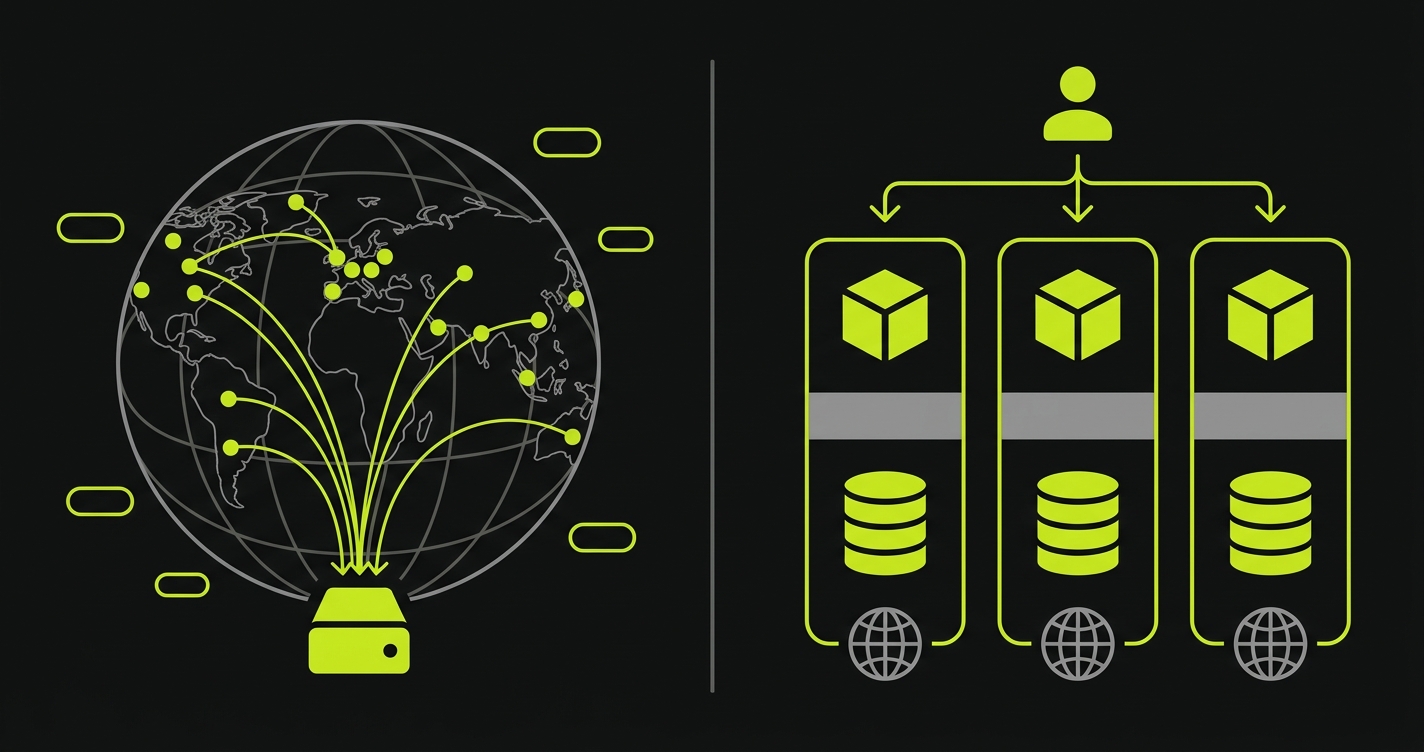
Multi-region and edge compute: what "edge" actually means on each platform
Both platforms advertise "edge" capabilities, but they mean different things.
Vercel's Edge Functions run on a distributed CDN spread across 70+ PoPs, geographically close to users. The trade-off is real: Edge Functions run in a Web API-constrained runtime. Node.js built-ins aren't all available. You can't run a database connection, a native module, or anything that requires a persistent process. Edge Functions are fast and global, but they're a subset of what a Node.js function can do. For Vercel, most full SSR workloads still run in a single AWS region by default (commonly iad1), not globally across their edge network. "Edge" is accurate for the subset of your code that can tolerate the runtime constraints.
Fly.io's "edge" is different: it means running your full container close to users, across roughly 35 regions. When you run fly scale count 3 --region ord,ams,syd, you have three real container instances in Chicago, Amsterdam, and Sydney. Each one runs your complete application: database connections, WebSocket servers, native modules, persistent state. Fly's anycast network routes each request to the nearest healthy machine. For latency-sensitive, full-stack workloads, this is meaningfully better than a single-region SSR deployment. A request from Sydney to a single-region Vercel SSR in iad1 adds roughly 200ms of round-trip latency versus a Fly machine running locally in Sydney.
The distinction matters for evaluation. If your workload is a Next.js frontend with mostly static content and occasional API calls, Vercel's edge is well-suited and the runtime constraints won't matter. If your workload is a full-stack application where even the database layer needs to be geographically close to users, Fly.io's multi-region containers are the better fit and Vercel's model can't match it without significant architectural compromise.
Preview environments: Vercel's automatic vs Fly's DIY
A preview environment is a temporary, fully deployed copy of your application created from a feature branch, reachable via a unique URL, so reviewers can test changes before merge.
Vercel generates a preview URL on every push to every branch. Zero configuration. The URL is deterministic, shareable with stakeholders, and linked in the GitHub PR automatically. Every project gets this starting on the free tier. Deployment Checks can then block the merge until registered test suites pass against that URL.
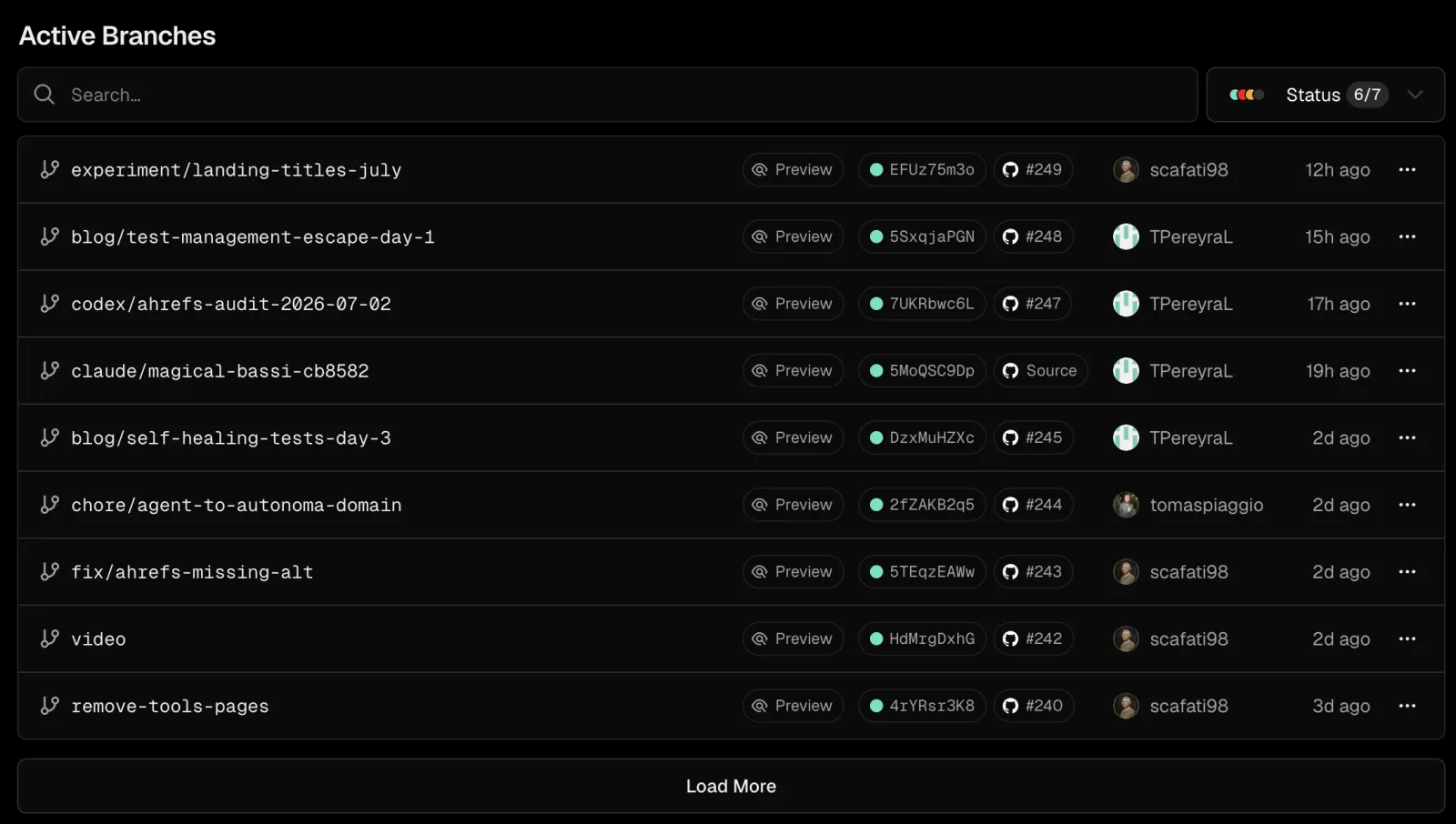
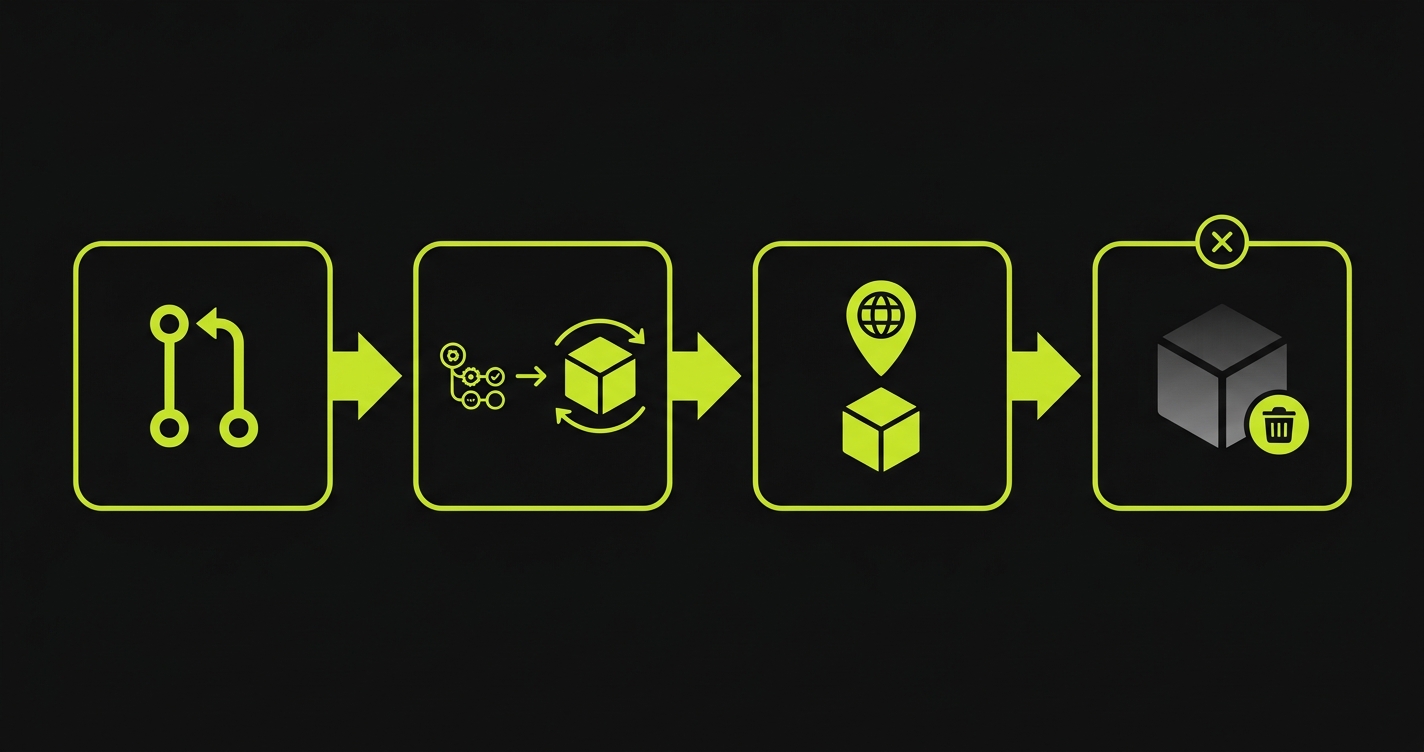
Fly.io has no built-in equivalent. Your services are persistent processes; there's no concept of a branch-scoped ephemeral deployment. To build preview environments on Fly.io, you script the lifecycle yourself. On PR open, you create and deploy a temporary Fly app. On PR close, you destroy it.
Here's the deploy-and-destroy workflow, the Fly CLI commands that power each side of the lifecycle:
That script handles branch name derivation, app creation, deploy, URL output, and teardown. The fly.pr.toml it references keeps preview machine specs lean:
The auto_stop_machines = true and auto_start_machines = true combination is important for previews: machines sleep when idle (no traffic during off-hours) and wake on the next request in about 125-250ms. This keeps preview environment costs predictable; you're not paying for 24/7 uptime on a dozen inactive PR environments.
For teams wanting full control over preview infrastructure beyond what either managed platform provides, the self-hosted preview environments approach takes this further, but for most teams, the GitHub Actions script above is sufficient.
The hybrid path: Vercel frontend, Fly.io backend
The single most common recommendation across fly.io vs vercel discussions isn't "pick one"; it's "use both." Deploy the Next.js frontend on Vercel (automatic previews, Deployment Checks, the global edge CDN) and run the stateful backend on Fly.io containers (database co-location, WebSockets, background workers, persistent volumes). The frontend calls your Fly.io backend over standard HTTPS with CORS configured.
The hybrid is popular because it avoids both platforms' weaknesses. You don't try to bolt a database onto Vercel's serverless model. You don't try to replicate Vercel's Next.js runtime optimizations on Fly. Each platform does what it does best.
The trade-off: you now maintain preview environments in two places. Vercel handles the frontend's preview URL automatically. Fly still needs your GitHub Actions workflow for backend preview apps. And when it comes to end-to-end tests, the question shifts: whichever platform serves your user-facing routes is the target for E2E tests. If that's Vercel, Deployment Checks cover the first layer. If your tests need to verify the Fly backend too, you're still scripting that piece. Most teams find the added complexity worth it for the separation of concerns. A few prefer the simplicity of keeping everything on one platform, and for those teams the choice collapses back to Fly.io or Vercel as a single-vendor decision.
The Abstraction Ladder: how Fly.io and Vercel compare on control vs convenience
A useful framework for this decision is what we call the Abstraction Ladder: a way of comparing deployment platforms by how much infrastructure responsibility the platform takes versus the developer.
At the top rung sits Vercel: you deploy code. The platform handles the build, CDN distribution, serverless runtime, preview URL generation, and Deployment Checks. You control almost nothing about the infrastructure; you control everything about your code. Less work, less control.
In the middle sits Fly.io: you deploy containers. The platform handles scheduling, networking, and anycast routing. You control the runtime, the regions, the machine sizes, and the volume mounts. More work, more control than Vercel; less than managing your own VMs.
At the bottom rung sit bare VMs and Kubernetes: you deploy processes on machines. You handle orchestration, scaling, routing, health checks, and everything else. Maximum flexibility, maximum ops burden.
Testing follows exactly the same ladder. Vercel automates the test integration; Deployment Checks are a first-class feature that blocks merges out of the box. Fly.io makes testing possible but requires you to build the CI workflow, generate the preview URL, and trigger the test suite yourself. The lower the rung, the more of the testing pipeline is your responsibility.
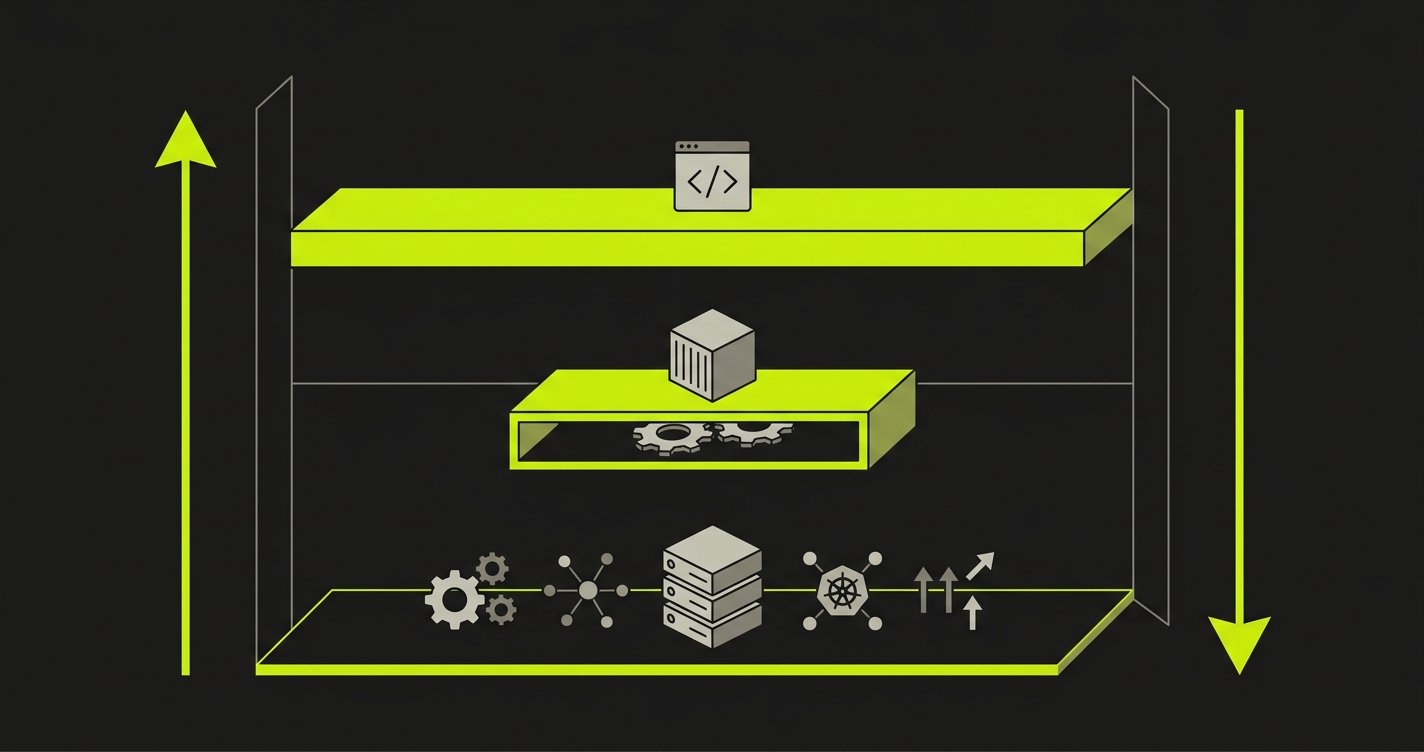
Neither position is correct in the abstract. The right rung depends on what your workload actually needs and how much platform abstraction your team is willing to accept in exchange for reduced setup work.
Testing: adding E2E tests to Fly deployments
Vercel's Deployment Checks are a genuine competitive advantage. A registered check provider runs tests against your preview URL and posts pass/fail back to Vercel. The deployment is held in "Pending" until all checks resolve. Reviewers see green before they click the preview link.
On Fly.io, you replicate this behavior yourself. The pattern is straightforward: Fly.io has no built-in equivalent to Vercel's Deployment Checks; you replicate the behavior with a GitHub Actions workflow that deploys the Fly preview app, captures the preview URL (https://pr-${PR_NUMBER}-myapp.fly.dev), runs tests against it, and posts a required status check back to the PR.
Here's a complete GitHub Actions workflow that handles the full lifecycle: Fly deploy, URL capture, test trigger, and teardown:
Autonoma is a managed preview-environments platform with E2E testing built in, so it doesn't have to consume a preview that another platform provisioned. This section covers the pattern for teams who want to keep Fly as the provisioning layer anyway and just point Autonoma's testing at it. We built Autonoma on Playwright, which is open source, runs anywhere, and isn't locked to any deployment platform's proprietary runtime. That matters for Fly.io teams who chose containers precisely because they don't want platform lock-in. The tests Autonoma generates are portable Playwright specs that happen to be AI-generated, and they run the same way whether the target is a Fly.io preview URL, a Railway URL, a Vercel preview URL, or one of Autonoma's own managed preview environments.
For E2E testing on preview environments, here's the practical flow when Fly stays your provisioning layer: Autonoma's Planner agent reads your codebase and generates tests. The GitHub Actions workflow deploys your Fly.io preview app, passes the URL to Autonoma, and Autonoma executes against the live preview environment. Results post back as a required GitHub status check, matching Vercel's Deployment Checks behavior without Vercel's platform. Teams who'd rather not own that Fly deploy-and-destroy scripting at all can skip this flow and let Autonoma provision the preview environment itself instead.
Scripting Fly previews yourself is more work than Vercel's Deployment Checks; that's the trade-off of keeping Fly as your provisioning layer, and Autonoma only closes the testing half of it, not the deploy-and-destroy scripting. Most Fly.io teams who value full container control consider that scripting, a few dozen lines of YAML, a reasonable price. Teams who'd rather not pay it at all can use Autonoma's own managed preview environments and skip Fly's provisioning layer for previews entirely, while still running Fly for production.
Pricing and scaling
Fly.io charges for machine-hours: CPU and RAM consumed while your machines are running. A shared-cpu-1x machine with 1GB RAM costs roughly $5-7 per month running 24/7. With auto_stop_machines = true, preview environments and staging apps sleep when idle, eliminating uptime costs for low-traffic environments. Scaling to three regions is roughly 3x base cost, managed by a single CLI command. There are no per-seat charges.
Vercel's Pro plan starts at $20 per member per month plus usage. The included limits are generous: 6,000 deployments per month, substantial bandwidth, and reasonable serverless function execution. For small solo projects, the Hobby tier is free. Cold starts on Hobby can stretch to several seconds after idle; Vercel mitigates them on Pro and Enterprise with warmed function instances, and Vercel's Fluid Compute / Active CPU billing (introduced to reduce wasted charges during I/O waits) softens the cost side. Neither approach gives you Fly's always-on guarantee from persistent containers.
Here's how the pricing lands at three workload archetypes most readers fall into:
| Workload | Fly.io | Vercel |
|---|---|---|
| Solo side project (always-on backend + DB) | ~$5-10/mo (1 shared-cpu-1x machine + small volume) | $0 Hobby (if DB hosted elsewhere; else partner DB cost) |
| Small SaaS (1 team member, DB + background worker) | ~$15-25/mo (2 machines + volumes) | $20/mo Pro + partner DB (Neon/Supabase) $0-19/mo |
| Multi-region production app (3 regions, redundant DB) | ~$45-75/mo (3 machines + replicated volumes) | Enterprise negotiation for multi-region SSR |
Multi-region is where the pricing divergence is sharpest. Three regions on Fly.io is three machines at your base machine cost. Multi-region on Vercel at the SSR level (not just Edge Functions) is an Enterprise conversation. For workloads that genuinely need geographically distributed compute with persistent state, Fly.io's pricing scales predictably. Vercel's scales through negotiation.
The comparison gets less clean at team scale. Fly.io's per-machine billing is transparent and predictable. Vercel's per-seat billing becomes expensive as teams grow but amortizes the DX value (zero-config previews, Deployment Checks, the Next.js runtime) across the team. If that DX value is high, the seat cost is worth it. If your team's workload doesn't need Vercel's DX advantages, you're paying for features you're not using.
When to choose Fly.io vs Vercel
Choose Vercel when your application is primarily a Next.js frontend or a JAMstack site, when your team's workflow depends on automatic preview environments that non-technical stakeholders can access without configuration, when you want Deployment Checks integrated out of the box, or when "backend" means stateless API routes rather than long-running services. Vercel's zero-config approach is its core value; if you need what it provides, there's nothing better in the category.
Choose Fly.io when you're running a full-stack app with a database that needs to be co-located with your API, when your workload requires WebSockets or other persistent connections that don't fit the serverless model, when multi-region SSR at the container level is a real requirement (not just "nice to have"), when you need SSH access into your production runtime for debugging, or when your team values open-standards containers that can move between hosting providers without platform-specific re-architecture.
If neither single-platform decision feels right, the hybrid path above (Vercel frontend plus Fly backend) is how most teams split the difference. And if you're evaluating container-based Vercel alternatives beyond Fly, the trade-offs in Railway vs Vercel and Render vs Vercel cover adjacent options with slightly different ergonomics.
What to avoid: picking Fly.io expecting zero-config preview environments and Vercel-style Deployment Checks out of the box. They don't exist. You build them. Conversely, picking Vercel expecting it to host your Postgres database and run background workers without external services; it won't. The platform mismatch between what you need and what the platform provides is where most evaluation mistakes happen.
For teams who have chosen Fly.io and want parity with Vercel's deployment verification experience, the path is Fly.io preview apps scripted via GitHub Actions, plus Autonoma for the E2E layer, or Autonoma's own managed preview environments if you'd rather not own that scripting at all. Fly gives you the infrastructure flexibility. Autonoma closes both the preview-provisioning gap and the testing gap that lower-abstraction platforms leave open by design.
Fly vs Vercel picks tend to hinge on one or two constraints. Worth a 20-min sanity check before you commit. Grab 20 min with a founder
FAQ
Yes, but it's not trivial. Vercel-specific features (Deployment Checks, automatic preview environments, Next.js runtime optimizations) disappear. You'll containerize your app, write a fly.toml, set up GitHub Actions for preview environments, and build your own testing pipeline. The upside is full runtime control, true multi-region deployment, and persistent volumes. If you're running a Next.js frontend without persistent backend state, the migration cost is rarely worth it. If you're moving a full-stack app that already needs containers, Fly.io is a natural fit.
Fly.io supports Next.js as a containerized application. You lose Vercel's native Next.js runtime optimizations, zero-config preview environments, and the Deployment Checks API. For Next.js apps without persistent backend requirements, Vercel remains the lower-friction choice. For Next.js apps inside a larger full-stack architecture with co-located databases and background workers, Fly.io makes sense as the unified platform.
Fly.io has no native preview environments, so you script them with GitHub Actions. On PR open: create the Fly app and deploy with fly deploy --app pr-${PR_NUMBER}-myapp --config fly.pr.toml. On PR close: fly apps destroy pr-${PR_NUMBER}-myapp -y. The preview URL follows the deterministic pattern https://pr-${PR_NUMBER}-myapp.fly.dev. The companion repo for this post includes a complete workflow you can drop into your project.
Yes, and this hybrid setup is the single most common recommendation across fly.io vs vercel discussions. Deploy the Next.js frontend on Vercel (automatic previews, Deployment Checks, edge CDN) and run the stateful backend (API, database, WebSocket server, background workers) on Fly.io containers. The frontend calls your Fly.io backend via standard HTTPS with CORS configured. This keeps Vercel's DX where it adds value and uses Fly's container control where you need persistent state. Whichever platform serves your user-facing routes is the target for E2E tests.
Not natively. Fly.io has no built-in equivalent; you replicate the behavior with a GitHub Actions workflow that deploys the Fly preview app, captures the preview URL, runs tests against it, and posts a required status check back to the PR. A few dozen lines of YAML gets you parity with Deployment Checks on Fly.io. Tools like Autonoma slot into that workflow as the E2E test runner, but the deploy-and-status-check scripting itself is always yours to own.
It depends on workload. Fly.io charges machine-hours with no per-seat fees. A shared-cpu-1x machine with 1GB RAM running 24/7 costs roughly $5-7/month. Three regions costs roughly 3x that. Vercel Pro is $20 per member per month plus usage. For solo developers running persistent full-stack services, Fly.io is usually cheaper. For larger teams where Vercel's DX value (zero-config previews, Deployment Checks) is high and the per-seat cost is shared across many users, the comparison is more nuanced. Multi-region on Fly.io scales predictably; multi-region SSR on Vercel Enterprise is negotiated pricing.
The Abstraction Ladder is a framework for comparing platforms by how much infrastructure responsibility the platform takes versus the developer. At the top, Vercel handles everything: build, CDN, serverless runtime, preview URLs, Deployment Checks. You deploy code. In the middle, Fly.io handles scheduling and networking. You deploy containers and own the runtime. At the bottom, bare VMs and Kubernetes require you to manage orchestration, scaling, and routing. Higher abstraction means less work and less control. Lower abstraction means more flexibility and more setup. Testing follows the same pattern: the lower your rung, the more testing pipeline you build yourself.
Firecracker is an open-source Virtual Machine Monitor (VMM) developed by AWS, originally powering Lambda and Fargate. Fly.io uses it to run each container as a lightweight microVM, providing full VM isolation with near-container startup speeds. Your app runs in a genuine VM (not a shared process namespace), which boots quickly across regions and has no cold-start penalty once running. It's the technical foundation for Fly's strong security isolation and fast multi-region deployment.


